Bloggito
A Miohki Theme
- Created: 01/08/2011
- latest Update: 04/01/2012
- By: Danny Ramirez
- themehybrid.com/themes/bloggito
- Email: dronixs@gmail.com
Thank you for downloading Bloggito. This theme features a custom audio player designed by Orman Clark and coded by Luke McDonald. Bloggito also supports post formats and a range of other goodies, thanks to the framework it is built on, Hybrid Core.
Hybrid Core

Hybrid Core is a framework developed by Justin Tadlock and the backbones of the Bloggito theme.
Here's a quick run-through of the features and extensions that Bloggito uses from Hybrid Core:
Features
- hybrid-core-menus
- hybrid-core-sidebars
- hybrid-core-widgets
- hybrid-core-shortcodes
- hybrid-core-post-meta-box
- hybrid-core-theme-settings
- hybrid-core-template-hierarchy
Extensions
- theme-layouts
- post-stylesheets
- dev-stylesheet
- loop-pagination
- get-the-image
- cleaner-gallery
If you're interested in learning more about this awesome framework, please visit the http://themehybrid.com/hybrid-core.
Child Theme
Although Bloggito features a theme settings panel it is not intended for heavy customization. If you'll like to make any changes to Bloggito, please create a child theme and add your changes there.
Step 1
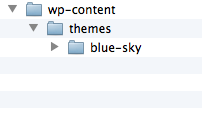
The very first step in creating a child theme is to create a folder inside of /wp-content/themes
You can name this folder anything you want, however there are few naming convention that you must abide by, such as adding a dash ( - ) instead of spaces. For example if you wanted to create a child theme called Blue Sky, you'll create a folder called blue-sky
Step 2
WordPress child themes are required to have at least a style.css file. In this file you specify a few things, such as the name of your child theme, the author and the parent theme. These is called the information header of a child theme.
/*
Theme Name:     Blue Sky
Theme URI:      http://example.com/
Description:    Few words describing your child theme
Author:         Your name here
Author URI:     http://example.com/about/
Template:       parent-theme
Version:        0.1.0
*/
The only two required fields are Theme Name and Template.
Theme Name is obviously the name of your child theme. This field is not case sensitive.
Template is the name of the parent theme's folder. This field is case sensitive ( Ex. Blue-sky is not the same as blue-sky).
Step 3
Your next step is to customize the look of your theme. You can start by using the parent's theme styling or begin from scratch. If you're only making small changes to the layout, such as chaning the links color, text color, etc, it would be beneficial to start by importing the parent theme's CSS, which defines the look of the theme.
To import the parent theme's CSS add the following to your style.css file after the information header:
@import url('../bloggito/style.css');
You can then add your own styling to customize the look of the theme.
Step 4
This next step is only for those who want to further modify the parent theme and not just customize the desgin but the content as well. In this case developers can create a functions.php file inside of their child theme with the following content.
<?php

add_action( 'after_setup_theme', 'my_child_setup', 11 );

function my_child_setup() {

	/* Get the parent theme prefix. */
	$prefix = hybrid_get_prefix();

	/* Actions and filters calls go here in the future. */
}

?>
If you'll like attach a function to an action or filter hook, you can do so inside of our example function above called, my_child_setup. This function itself is attached to the after_setup_theme function with a priority of 11, meaning it will activate or run after the parent theme's setup function. All functions in WordPress have a default priority of 10, a lower priority means it will run before, while a higher priority means it will run after the parent theme's functions.
Audio Player
The audio player featured in Bloggito is designed by @ormanclark and coded by @thelukemcdonald.
The player is created via jPlayer, a free and open source JQuery plugin.
Using the audio player
To use the audio player you can simply upload a mp3 file to your Media Library, create a new post and select your mp3 file from the list, under the Bloggito Audio Link meta box.
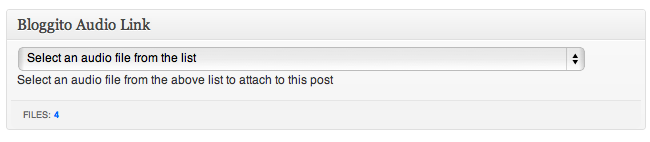
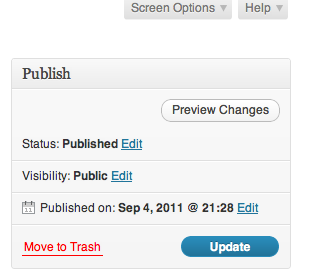
If the Bloggito Audio Link meta box is not shown, you can enable it under Screen Options.
Customizing the audio player
The audio player comes with two skins, black-green, and black-yellow. The default skin used by the player is black-green. All skins are found inside of /bloggito/js/skin. They are essentially CSS files and a .png image.
If creating a custom skin, use the default skin as a starting point. Don't forget to change what skin your audio player will use. This can be done by changing the CSS file name from your header.php file, in the following code:
/js/skin/jplayer-black-and-green.css
Action Hooks
Bloggito features a few action hooks that allows you to insert content without having to physically modify the template files. You'll mostly find these action hooks before and after a div, or anywhere a theme author wants to allow end users to hook things into.
The following lists all the action hooks available in the Bloggito theme.
- before_page_container - can be found before the #page-container div.
- before_page_header - can be found before the #page-header div.
- before_hgroup - can be found inside of the #page-header div, before hgroup.
- after_hgroup - can be found inside of #page-header, after hgroup.
- after_page_header - can be found after the #page-header div.
- before_content - can be found before the #content div.
- before_entry - can be found before the WordPress loop.
- before_article_container - can be found before the .article-container div.
- before_article - can be found before a post/page article element.
- before_entry_content - can be found before the .entry-content div.
- after_entry_content - can be found after the .entry-content div.
- after_article - can be found after a post/page article element.
- after_article_container - can be found after the .article-container div.
- before_commentslist - can be found after the #comments-title, before the .commentslist ordered list.
- after_commentslist - can be found after the .commentslist ordered list.
- before_comment - can be found before a comment's article element.
- after_comment - can be found after a comment's article element.
- default_sidebars - can be found before the #content closing div tag.
- before_sidebar_primary - can be found before the #sidebar-primary section.
- after_sidebar_primary - can be found after the #sidebar-primary section.
- before_sidebar_secondary - can be found before the #sidebar-secondary section.
- after_sidebar_secondary - can be found after the #sidebar-secondary section.
- after_page_content - can be found after the #content div.
- before_page_footer - can be found before the #page-footer div.
- footer - can be found inside of #page-footer.
- after_page_footer - can be found after the #page-footer div.
Filter Hooks
Bloggito also supports a few filter hooks. Most of these filter hooks are added by the Hybrid Core framework. Filter hooks allow you to modify the text before it is displayed in your browser.
The difference betwen action hooks and filter hooks is simple. Action hooks allows you to add new data, while filter hooks allows you to modify what is already written.
Functions
The Bloggito theme contains many functions which perform many different things.
The following is a list of all the functions created by Bloggito omiting those created by Hybrid Core.
bloggito_theme_setup
Sets the theme features and extensions. It also sets the theme's prefix
@since: 0.1.0
bloggito_embed_defaults
Sets the width of all embed objects to 648px.
@since: 0.1.0
bloggito_get_list_comments_args
This function is attached to the bloggito_list_comments_args filter hook, created by Hybrid Core. The only thing it modifies is the avatar size, to 60px.
@since: 0.1.0
bloggito_get_primary_menu
This function is attached to the after_hgroup action hook. Loads the contents of the menu-primary.php template file, which adds the primary navigation.
@since: 0.1.0
bloggito_get_header
This function is attached to the after_hgroup action hook. Loads the contents of the sidebar-header.php template file, which loads widgets into one of the six available Widgitized sections.
@since: 0.1.0
bloggito_get_before_content
This funcitons is attached to the after_page_header action hook. Loads the contents of the sidebar-before-content template file, which loads widgets into one of the six available Widgitized sections.
@since: 0.1.0
bloggito_get_primary_sidebar
This function is attached to the default_sidebars action hook. Loads the contents of the sidebar-primary.php template file, which loads the widgets into one of the six available Widgitized sections.
@since: 0.1.0
bloggito_get_secondary_sidebar
This function is attached to the default_sidebars action hook. Loads the contents of the sidebar-secondary.php template file, which loads the widgets into one of the six available Widgitized sections.
@since: 0.1.0
bloggito_get_after_content
This function is attached to the after_page_content action hook. Loads the contents of the sidebar-after-content.php template file, which loads the widgets into one of the six available Widgitized sections.
@since: 0.1.0
bloggito_get_after_singular
This function is attached to the after_entry action hook. Loads the contents of the sidebar-after-singular.php template file, which loads the widgets into one of the six available Widgitized sections.
@since: 0.1.0
bloggito_get_loop_nav
This function is attached to the after_entry action hook. Loads the contents of the loop-nav.php template file. This template file contains the navigiation (prev, 123, next) which is displayed after all the posts in the homepage, or right after a post in the singular view.
@since: 0.1.0
loggito_disable_sidebars
This fucntion is attached to the sidebars_widgets filter hook. Disables both the primary and secondary sidebars if viewing a one-column post/page.
@since: 0.1.0
bloggito_one_column
This function is attached to the template_redirect filter hook. This function sets the layout of the theme to one-column by referencing another function, bloggito_theme_layout_one_column, if the primary and secondary sidebars are disabled, and iv viewing an attachment or 404 page.
@since: 0.1.0
bloggito_theme_layout_one_column
This function is referenced in the bloggito_one_column() function. Sets the default layout to one-column.
@since: 0.1.0
bloggito_site_title
Displays the site's title in an anchor tag, wrapped in an h1. Developers can filter this title by using the bloggito_site_title filter hook.
@since: 0.1.0
bloggito_site_description
Displays the site's description wrapped in an h2 tag. Developers can filter this by using the bloggito_site_description filter hook.
@since: 0.1.0
bloggito_posted_on
Displays the date of when a post was published in the format of x time ago.
@since: 0.1.0
bloggito_featured_image
Displays the featured image wrapped in a div with a class of featured-image. Uses the get-the-image Hybrid Core extension. There are two action hooks available in this function, before_featured_image, which is placed before the .featured-image div, and after_featured_image, which is place after the closing div.
@since: 0.1.0
bloggito_audio_css
This function is attached to the admin_head action hook. Styles the Bloggito Audio Link meta box in the Post Edit screen.
@since: 0.1.0
bloggito_jplayer_audio
Creates a custom field of bloggito_audio. If this field is not empty it adds the required JavaScript to run jPlayer.
@since: 0.1.0
bloggito_scripts
This function is attached to the wp_enqueue_scripts action hook. Registers and enqueues all the scripts and styles necessary for the theme.
@since: 0.1.0
bloggito_wp_head
This function is attached to the wp_head action hook. Inserts a few javascript calling the FitVids and the TinyNav script. FitVids scales down any video embeds as the screen size reduces while TinyNav converts the primary menu into a dropdown for small screens.
@since: 0.1.0
bloggito_mce_settings
This function is attached to the tiny_mce_before_init filter hook. Allows the content of the Visual Editor to be styled by using the same class as the post's class removing the need to duplicate said styles in order to match the front-end design. Thanks to Seamus Leahy for providing the function and Chris Coyier for featuring it at digwp.com.
@since: 0.1.0
Template Files
WordPress allows you to have different template files, each one containing more or less content than the other, but all working together to create the overall bulk of the site. Bloggito takes advantage of this to allow you to easily separate different type of content, such as when you have the need to display different content depending on what post format is being displayed.
The following is a list of all the page templates found in the Bloggito theme.
- 404.php - used whenever viewing an invalid URL.
- archive.php - used whenever viewing the archives page.
- comment.php - used to display an individual comment. To modify the content of a more specific comment type (pingback, trackback) developers can use, comment-{$comment_type}.php, comment-pingack.php, and comment-trackback.php template files.
- comments.php - displays the comments ordered list and the comment form.
- footer.php - the footer template file, used by all the other template files except by the header.php template file. Closes all the remaining divs and html document.
- header.php - the header template file, used by all the other template files except by the footer.php template file. Begins the html document, header meta, and opening divs for different sections, such as #page-container, and #page-header.
- index.php - default template file used to display the posts in the front page whenever home.php and front-page.php template files are not present. Pulls content from loop-content.php.
- loop-content-aside.php - displays the content of the Aside post format.
- loop-content-audio.php - displays the content of the Audio post format.
- loop-content-error.php - used whenever there are no posts to display or when there's not a 404 page template.
- loop-content-gallery.php - displays the content of the Gallery post format.
- loop-content-image.php - diisplays the content of the Image post format.
- loop-content-link.php - displays the content of the Link post format.
- loop-content-quote.php - displays the content of the Quote post format.
- loop-content-single.php - displays the content of a single post.
- loop-content-video.php - displays the content of the Video post format.
- loop-content.php - default template to display the loop's content.
- loop-footer.php - displays the post's footer meta information (category, tag).
- loop-header-archive.php - displays a post's header meta when viewing search results, viewing the archive page, taxonomy page, categories page, etc.
- loop-header.php - displays a post's header meta information.
- loop-nav.php - displays the different page navigations, used when viewing an attachement page, a singular post and front page.
- menu-primary.php - displays the primary menu.
- search.php - used to display the search results.
- searchform.php - used to display the search form.
- sidebar-after-content.php - displays the After Content Sidebar.
- sidebar-after-singular.php - displays the After Singular Sidebar.
- sidebar-before-content.php - displays the Before Content Sidebar.
- sidebar-header.php - displays the Header Sidebar.
- sidebar-primary.php -displays the Primary Sidebar.
- sidebar-secondary.php - displays the Secondary Sidebar.
- singular.php - displays the content of a post when in singular view mode, pulls the content from the loop-content-single.php template file.
Bloggito uses Hybrid Core's template hierarchy which is a bit different from the default WordPress hierarchy. For more info visit the Hybrid Core's template hierarchy page.
Changelog
Version 0.1.3
Fixed more design bugs (gallery, site-title).
Version 0.1.2
Added attachment navigation.
Version 0.1.1
Fixed some design bugs (full width container background).
Version 0.1.0
Initial Release.
Sources and Credits
I would like to thank the following people for making their resources freely available:
- Justin Tadlock - Hybrid Core
- Orman Clark - Audio Player psd
- Luke Mcdonald - Audio Player html code
I would also like to thank the folks involved in the following projects:
Copyright & License
Bloggito is licensed under the GNU General Public License, version 2 (GPL).
2012 © Danny Ramirez. All rights reserved.